


What up, Lab Crew
Just in case you didn’t know, a few ‘soft’ clippers in the MPC/Force OS don’t get much shine.
(Sorry if I ramble on in the video; it was kind of off the cuff)
T; :DR:DW: - Drop your volume to about -18dB and run your sounds through Distortion Custom or Distortion Grimey for two extra clippers.
While AIR Distortion, Lo-Fi, Transient Designer, and a few of the Old School emulations can also qualify, there are three others you might want to check out.
Despite the lack of clarity in the current user guides for the MPC and Force, and the seemingly novice-focused marketing, I love what the developers at Akai/InMusic have done. Digging back into the MPC4000 and MPC5000 manuals, I’ve found some gems in plugin coding that don’t seem widely known.
A few days ago, a gentleman posted in the MPC users Facebook group about getting his drums thicker.

There are many approaches, but I feel MPC/Force needs a straightforward way to get great results. So I set out on a quest.
When I make music, I like to think of myself as the intermediary between a great performance and a great recording. With that mindset, I’ve started digging deeper into the MPC effects to find more unique, simple ways to shape sound.
It’s widely known that what we see affects how our ears perceive sound. Since the Akai insert effects lack the skeuomorphism we’re accustomed to in modern VSTs, it’s easy to see them as archaic, useless, and lacking modern features. If you happen to believe that, to your credit, you may be right, but that doesn’t mean they aren’t useful tools.
In fact, outside of harmonic modeling, most plugins do the same thing, just in different ways. Some EQs or compressors might have different curves; however, with a bit of training, you can essentially replicate any sound processing. In the digital domain, that is.
That might be hard to believe, especially when you compare the AIR plugins with developers like UAD or Slate Digital. But no matter the GUI or plugin design, an EQ is an EQ;Q a compressor is a compressor.
Ultimately,y there are only a few ways that audio is processed. Linear Processing and non-linear Processing. Another dimension is whether the processing is static, meaning it does not change depending on the signal, or non-static, adapting or varying based on the signal.
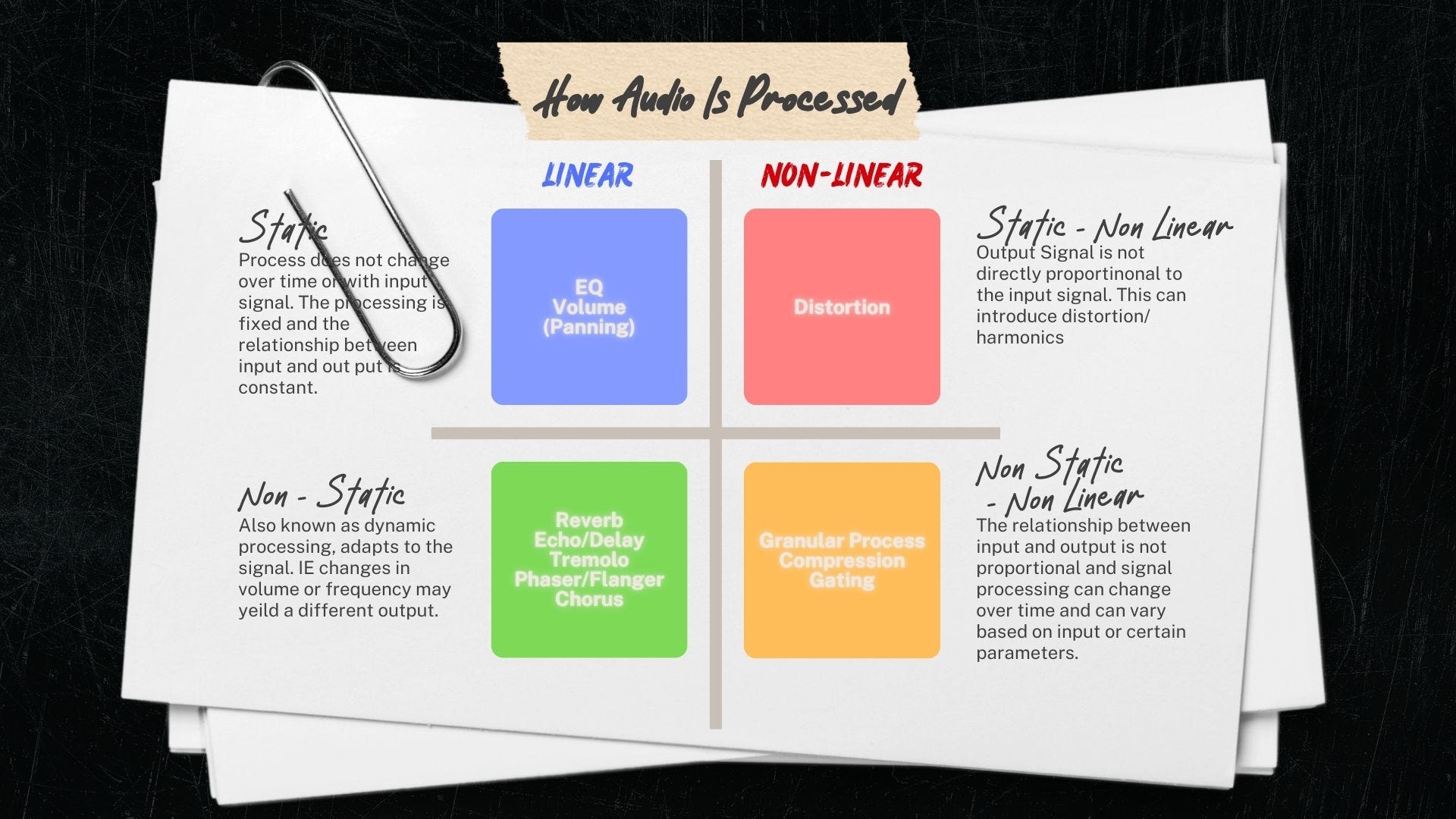
With a simple understanding of these concepts, or even a quick reference to the chart, you’ll quickly see that the AIR plugins are relatively straightforward in how they process audio.
1. AIR Compressor as a limiter/Soft Clipper
As I explained in the video, most compressors can also act as limiters depending on how you adjust the ratio (100:1). If you add a knee parameter and set the attack and release as fast as possible, you effectively get a soft clipper.

This is one way of getting thicker drums, louder mixes, etc.
Another way is using distortion. It’s pretty well known that AIR distortion is also a soft/hard clipper, but what about the Akai Plugins?
Well, it turns out there are two pretty good ones in Akai’s distortion models as well.
2. Distortion Grimy as a soft clipper
Luckily, I found the MPC 5000 manual, which explains how some of the distortions (alongside other plugins) work under the hood.
While other distortions focus on the frequencies entering the effect, either boosting or attenuating, there was one word that stuck out in two distortion effects: “clip”

Since clipping requires a threshold, passing a signal below it gives you more control over the distortion effect.
In Distortion Grimey’s case, there's a sort of notch filter that, when opened completely, boosts the 9kHz range. For most material, this filter is open enough to consider slightly warm and transparent.

This is where gain-staging comes i:, if there is a clipper, what is its threshold? Essentially, the plugin will peak at about -5dB to -6dB. This means that any signal below that should pass through relatively unaffected.
I found that about -18dB to -24dB is the Goldilocks zone.

In a nutshell, if you drop your volume super low and use this plugin to bring it up, you can thicken up your sound without adding a ton of gain.
Even though the loudness wars are over, plugins like this not only get your sound louder with more headroom, but also improve the stereo image and depth in the mix.
Example Track “A”
Example Track “B”
Though the tracks sound similar in volume, IMHO one has more punch and clarity while still maintaining ~ -5 dB of headroom.
See if you can accurately guess which one.
3. Distortion Custom is also a clipper
But it’s a little less straightforward to use this way. Again, you want to start with a relatively low signal and drive the signal subtly.


The MPC5000 explains that you can control the distortion effect starting at the zero crossing, similar to crossover distortion in amplifiers.
The goal is to let as much of the signal through as possible (under the threshold) and shape the sound subtly by adding clipping.

Honestly, you can take the settings from the image above and apply them. It can be tedious for someone unfamiliar with the plugin, and at the wrong levels it’s more a sound-design tool than a mixing tool.
I do like how this plugin adds a bit more harmonic content to low frequencies; however, it’s a very strong distortion effect. Better suited for percussive elements or a flat vocal recording.
Note from the Editor:
In some weird way, I find myself rejecting the idea that manufacturers are lying to us and/or trying to deceive us, and I believe the truth lies somewhere in the middle. For those who care, I believe that all of the plugin manufacturers /DAW manufacturers aren’t being 100% transparent about what is happening inside the box.
I believe some DSP isn't that complicated at its core, that some of it is based on open-source code, and that we’re paying for fancy GUIs (and backend trademark licensing) when we buy some of these plugins.
But things have always been that way: when looking at samplers and workstations from the past, certain Motorola chips or voltage filters were used across multiple brands and products, with the final differentiating factor being the combination of those and the coding that binds the system together cohesively.
Another thing that has also remained constant is that a great mix is a great mix. Regardless of what it’s tracked/recorded on. Learning how audio works, frequency, and mixing will benefit just as much as learning to program drums or flip a sample.
Rather than join the bandwagon that says something isn't as good as the past, I prefer to embrace current challenges with insights from the past and bridge the gap between trying something new and what’s tried and true.
2026 update: all of these are still functional on your current MPC 3.10.1 versions. We have a feeling none of these clippers are going away anytime soon; if they are, we’ll keep you updated.

