


This article was released before the MPC Live III release date on October 25 2025, we cover what we speculated and made a few edits on what we got wrong.
We use affiliate links to help our readers connect with great products made by great teams. This way we all win.
AKAI MPC Live 3: Features and the Future of the MPC Workflow
What’s up, Lab Crew!
Today, we’re going to be talking about the release of the AKAI MPC Live 3. After all the Rumors circulating for months, let’s see what they got right and where they missed the mark!.
Thanks to a pretty dope leak from a music distribution site (and more than likely a strategic marketing plan from Akai), we got early insights into what the MPC platform had to offer in one of Akai’s flagship MPC offerings.
Blending Products: New Features on the MPC Live 3
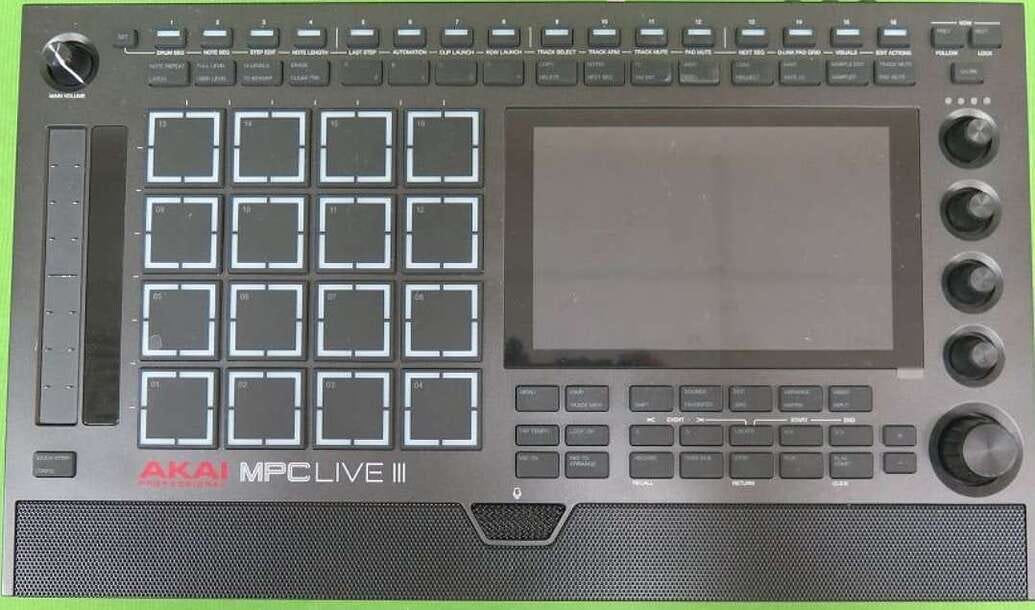
The first things you’ll notice are the slightly larger screen and different pad design. AKAI seems to be pulling features from across their lineup and fusing them into this new model.
The Touch Slider
Borrowed from the MPC Studio, the touch slider now sits on the left side of the device.
This could be huge for integrating with underused features like the touch effects plug-ins. If the slider plays nicely with them, it’ll make transitions between hardware and software feel way more fluid.
The New Step Sequencer
The biggest standout is the top row step sequencer. At first glance, it looks like a traditional step sequencer—but I think it’s more than that.
This row might also handle shortcuts like automation, track mutes, and sequence switching. For AKAI, which has always leaned pattern-based rather than step-based, this is a bold shift.
To me, this feels like AKAI is courting FL Studio users—building a bridge between traditional MPC heads and the newer producer crowd.
A Bridge to New Users and Workflows
Traditionally, AKAI has been synonymous with boom bap and hip-hop. But with the MPC Live 3, I see them reaching for a broader demographic.
The design choices—especially the sequencer—signal a move toward genre versatility, appealing to producers outside of the usual hip-hop circles. That’s a good thing.
The Quad-Zone Pads
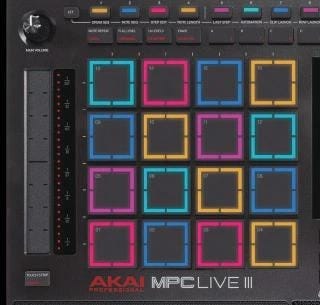
Another big change: the pads. Each pad appears to have four distinct zones, marked by a cross pattern.
Imagine triggering different sounds depending on which corner you hit—or blending sounds live. That would be a game-changer for both sound design and performance.
Enhanced Controls and Portability
The transport controls are mostly the same, but new menu options stand out: next sequence, automation, clip launch, track select, track arm, mutes, and more.
I’ll be real—I’ve never been the biggest fan of the “Live” format. I like my gear plugged in and ready. But even I can admit the portability is tempting.
If I’m hanging with my lady and want to sketch out an idea, this could be the move. Plus, word is there’s a built-in mic for quick foley or vocal recording. That’s dope.
Under the Hood: RAM and The Force’s Influence
This thing reportedly ships with 8GB of RAM—four times the previous models. That alone should boost track counts and open up heavier projects.

But let’s be real: almost every innovation we’re seeing in new MPCs started with the AKAI Force. That machine was ahead of its time. Features like envelope followers, performance-oriented workflows, and deeper sound design were already baked into the Force, and AKAI’s been slowly trickling them into the MPC line.
More Buttons, More Possibilities
From the leaked shots, the Live 3 seems packed with buttons—maybe 48 or more across the front panel.
It’s not quite Force-level (which had 64 pads plus a ton of controls), but it’s clear AKAI is leaning into a button-rich workflow. That opens the door to more complex sequencing, live performance, and modern production approaches that go way beyond the “classic MPC” vibe.

With AKAI leaning into that lane and adding more features and buttons, it opens up a lot of possibilities for creating sounds, but also for moving into a current workflow that is completely different from the traditional MPC approach.
Sound Quality vs. Workflow
Here’s where I know some MPC users will push back. Old-school heads swear by “that analog MPC flow,” even though it’s always been digital.

The truth is, workflow and sound quality are linked. If your workflow is fast and inspiring, you’ll make better music. And yes—it’s all ones and zeros now. The warmth people remember often came from flaws in older signal paths. Those flaws are mostly gone.
So today, the producer is responsible. You can’t just rely on the box to make your beat sound good—you’ve got to craft the sound yourself. Thankfully, the MPC already gives you the tools.
Professional Audio Concerns: Aliasing and Gain Staging
That said, I have a few critiques.
Many AKAI plug-ins lack anti-aliasing filters, which can muddy your mix. The Crates Motel did a very good job covering this.
The gain staging in these plug-ins is a mystery. Compressors and distortions have sweet spots, but AKAI doesn’t tell us what they are.
If you look at older forums—or even packs from producers like ARAB Muzik—you’ll notice his melodic samples are staged way down around −20 dB, while drums sit hot at 0. That’s intentional. Without proper staging, your mix will fall apart.
This is where AKAI needs better documentation. Too many users blow preamps or fry gear because they don’t understand signal flow. For a professional tool, that’s a big gap.
In particular, one we found was the MSXII Fly Tape, which I wrote about here.
The Need for Documentation
The aliasing is affecting a lot of the sound quality. In addition to that, when people are pulling up these plug-ins, there’s not a lot of documentation coming from AKAI that explains how to use this stuff.
It is a professional tool, so I think the expectation is that the user already knows signal flow. But a lot of times, the people who are purchasing the product have no idea about signal flow. Case in point: open up any one of these groups, and you’ll find a ton of posts about people blowing their pre-amps or audio card because they don’t know how to use phantom power. That’s a big indicator that people don't understand signal flow. It’s one of the first things we learn in audio school.
Looking Ahead
What does the future look like? Honestly, I’m excited for the MPC Live 3! I think it'll be a good addition to the lineup. If the MPC Live 3 looks like this, I wonder what the next iteration of the flagship MPC will look like.
I’m hoping they continue the AKAI Forcepath:d a live performance tool in addition to a mixing tool. I would love to pull up tracks on the AKAI Force and master on this device, or mix only on this device, and have access to more than 8 tracks, up to 32. A 32-track limit would make my day, especially if you can group things into folders.
Hopefully, AKAI is thinking about their products and expanding the amount of memory we have, and expanding the user base to include professional audio people as well as beginners. I hope they highlight the software now and how you can use it—and the tons of plug-ins they’re releasing, especially through their relationship with Native Instruments—to make it a sound design tool, a mixing tool, and a mastering tool. Basically, your entire home studio, “outside of the box,” is now in the box.
FCC Confirmation
Finally, this isn’t just rumor anymore. The FCC confidentiality agreement has expired, and we now have official documents confirming the device’s design and internals.
Expect MPE support, Bluetooth, Wi-Fi, and the usual MPC connectivity—just refined and built on.
The only question left is: how much of the hidden feature set will AKAI actually document this time, instead of leaving us to stumble into it?
I’m excited to see what AKAI says the feature set is. And then, of course, there’s always an underlying feature set that isn’t really outlined. Ideally, they'd put that in the manual this time instead of having us figure it out, but that’s a conversation for another day!
Make sure to subscribe and share this with somebody! Talk to you next time.
What feature of the rumored AKAI MPC Live 3 are you most excited about?