


What’s up, Forum,
For the past 20 years, people have debated whether FL Studio 21 or FL Studio 11 ‘hits harder’.
Even Image-Line joined in, releasing this video explaining that FL Studio’s audio engine is the same in every release.
I firmly believe in the simple (and kind of unknown) fact that gear sounds good not just because of what it is, but because of what it does.
So let’s look at what FL Studio did great and let’s emulate that with plugins.
Does FL Studio 11 knock harder than FL 20??? 👀 🤯
”When you open FL 11, there is a limiter on the master just like FL 20. But when you look at the limiter, the gain knob is set to 5.5dB of gain.
In this two-minute video, Decap masterfully covers what Image-Line took ten minutes to explain.
If what Decap AND Imageline are saying is true, emulating this on any system shouldn’t be that hard technically.

Looking at the settings, it seems that there is a slight envelope on the gain reduction. We can assume this is a kind of ‘soft clipping’ effect.
You don't necessarily want to avoid clipping; it can add punch and dynamics to your drums in a mix without raising the dB too high.
But before we slam our mix into a limiter, we know that after a few dB of limiting, we’ll run into clipping and destroy the mix.
Of course, we could just throw a limiter on, add 5.5 dB, and adjust the lookahead to 3-5 to match FL Studio’s curve settings. But that would be boring lol.

Remember we’re talking about mixing, so at this point, we’re throwing your ‘engineering hat’ on.
This way, you can use this trick in all kinds of mixing or mastering applications
So first, gain-stage the mix so that each track is hitting the digital-analog sweet spot (-18 dB...), then of course push things forward or backward to your taste.
If we’re talking about that “Southside/ 808 Mafia type sound,” then your bass drum (kick) and 808 can be a little louder in the mix.
(Try to have a bare minimum -10dB of headroom on your master fader)
I highly suggest watching this video below.
After watching the video, you might be tempted to place your clipper before your limiter instead of AD conversion, using the limiter to bring things up, right?
But that is why we put on our engineering hats; FL does things a little differently.

So knowing what we know now, we’re going to put a clipper AFTER our limiter in the signal flow.
We want to reinforce the ‘pocket’ in the beat and get a more polished release sound.
So first I grab my AIR Distortion Plugin.
You can copy these settings here

We’ll add a bit of soft clipping to the signal before we use a limiter to add more consistent gain reduction.
Since we don’t want to completely slam everything, remember the principle of mastering: -2 dB is pretty much the maximum amount we want to limit.

So this is where you just adjust your gain, aiming for -2dB MAX gain reduction on your 2 Bus.
If you need MORE punch, I’ve found adding an MPC3000 emulation (or bit crusher) before or after limiting sounds pretty good too; it’s like 2 layers of clipping
Just know that if you’re sending it to mastering, it will have distortion, and it’s LOUD.
And that’s kind of where their argument about ‘sound’ gets hilarious.
If you want that “sound,” just turn the volume up.
Well, it used to be that simple in the analog domain; however, it’s the same concept in a DAW.
Just add a signal flow limitation that adds some great harmonics and drives that signal up until it sounds good.
So, of course, here are some examples
Track 1.

I use Air Enhancer to bring up the highs and the MPC 3000 emulation before the soft clipper to add more punch.
Track 2.

I turn off the ‘soft clipper’ and add 5dB to the limiter. While this mix is ‘cleaner’, it lacks that ‘finished’ sound of Track 1.
In Track 1, you can hear the soft clipper pushing things up and in your face with that ‘finished’ or ‘polished’ sound.
For me, this is the sound I'm looking for; if I wanted more clarity and space, I’d send in option #2.
If you’re still chasing that sound today, even though the FL Studio debate has moved WAAAY past this point, you can also just grab a copy of AIR Soft Clipper, pop the “FeeLS fruity” preset on, and call it a wrap!
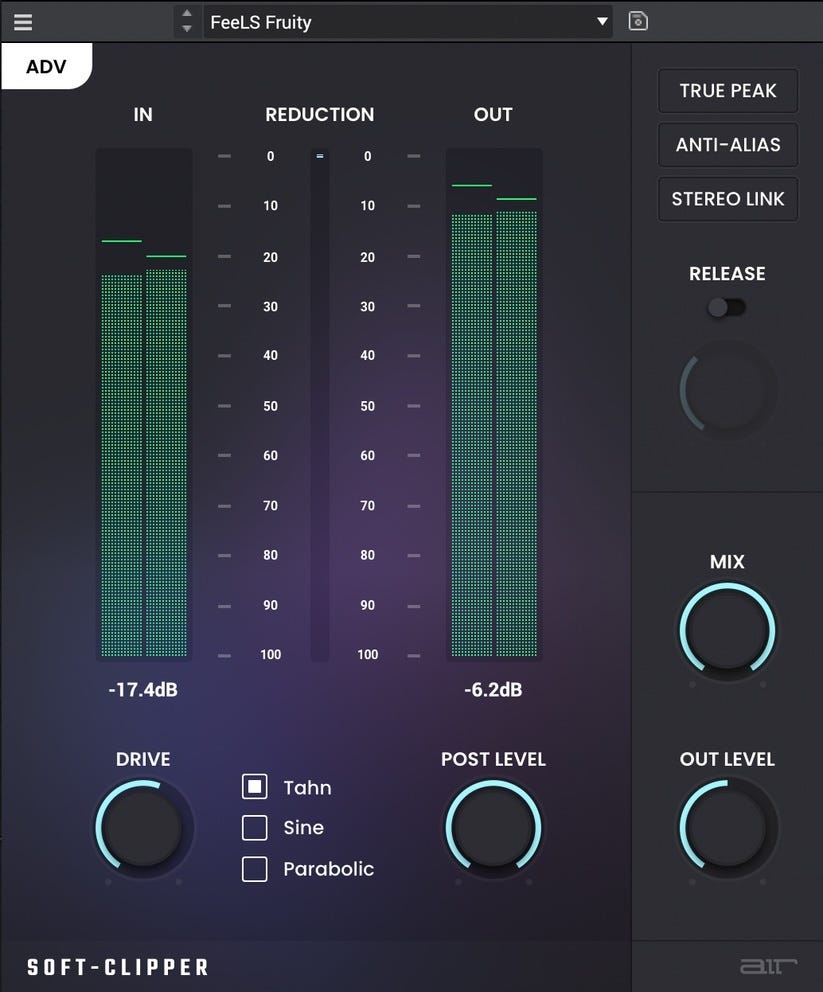
So try this out, make sure to gain stage your tracks, ;ven if you’re working at 32-bit float, plugins may operate differently
Also, these are the types of mixes that mastering engineers HATE to get
At this point, you’re acting as the final engineer; you’re determining the final product's loudness.
The best saturation plugins for hip-hop beats in 2026

The best saturation plugins for hip-hop beats in 2026